From blank slate to distributed convocation in minutes

Stop coordinating meetings across email, shared drives, and calendar invites. Create agendas, attach materials, track RSVPs, and notify participants — all from one workspace. Know exactly who opened what, when.

14 days free
No credit card required
24/7 support
Atlas Gov New Meeting creation dialog at step 2 (Meeting Details), showing monthly recurrence set to the fourth Monday, Microsoft Teams selected for video conferencing, and Atlas AI transcription enabled, over a Board of Directors regular monthly meeting page.
Atlas Gov Agenda Builder interface demonstrating folder import and agenda reuse, converting uploaded files into structured agenda items.
Import Once, Reuse Forever

No more rebuilding agendas from scratch every meeting

Agendas built manually in Word, copied into emails, recreated from memory next month. Hours of repetitive work, every time.

With Atlas Gov, drag a folder and it becomes a structured agenda. Copy any past meeting with one click. Set up automatic recurrence. Your first agenda takes 3 minutes. The next ones take even less.

agenda-builder-everything-in-one-place-nothing-in-email.png → "Atlas Gov Agenda Builder interface showing centralized meeting materials with per-item attachments, comments, and document requests.
Everything in One Place, Nothing in Email

One place. Every material you need for your meeting.

Materials scattered across email threads, shared drives, and WhatsApp — directors downloading wrong versions, governance officers chasing confirmations manually.

Atlas centralizes everything: attach documents per agenda item, add comments with @mentions, request documents from participants, protect PDFs, and control Bluebook inclusion. Send convocations with personalized messages — participants are notified instantly. No more forwarding. No more "which folder was that in?"

agenda-builder-complete-visibility-before-the-meeting-starts.png → "Atlas Gov Agenda Builder interface displaying real-time tracking of who opened materials, downloaded attachments, and confirmed attendance.
Complete Visibility Before the Meeting Starts

Did everyone get the materials?" — You don't have to ask anymore.

When you send by email, you can only hope directors read them. You follow up manually. You wonder who's prepared until the meeting starts.

With Atlas, you see who opened the Bluebook, who downloaded attachments, and who confirmed attendance — in real-time. Track confirmations, send reminders with one click, and walk into every meeting knowing exactly who's ready.

How Agenda Builder streamlines your meeting workflow

Before the Meeting

Create structured agendas in minutes, not hours. Import a folder from your desktop and Atlas Gov transforms it into organized agenda items. Copy past meetings with one click, or set recurring meetings that auto-create on your schedule. Attach materials per topic, add comments with @mentions, request documents from participants, and set permissions in bulk — all before the convocation goes out.

  • Folder import — Drag a folder and Atlas preserves the structure as agenda items with attachments ready to go

  • Recurring meetings — Auto-create weekly, monthly, or custom-scheduled meetings  

  • Per-item attachments — Each agenda topic has its own materials, comments, and access controls

  • AI Compare — Updated a document? AI highlights exactly what changed between versions  

  • Meeting Cast — Directors can listen to the Bluebook as audio, ideal for preparing on the go 

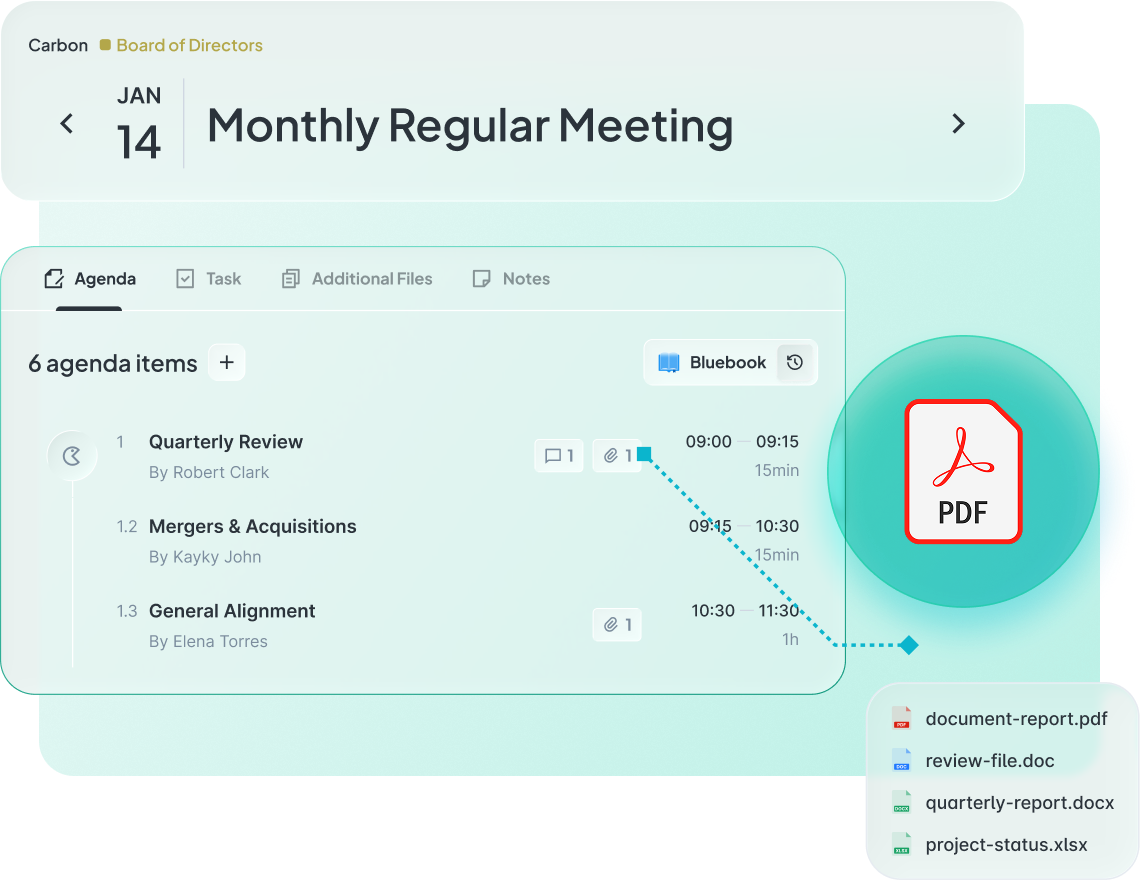
Atlas Gov Agenda Builder interface showing a structured monthly meeting agenda with topics, time slots, attached PDF documents, and file imports.

Trusted by leaders elevating governance excellence

Hear from governance officers and board directors who use Atlas Gov every day

Trusted by 650+ organizations and 25.000+ governance professionals worldwide.

C&A Company Logo
CSN Company Logo
CVC Company Logo
ITAIPU Company Logo
AXIA ENERGY Company Logo
RIACHUELO Company Logo
C&A Company Logo
CSN Company Logo
CVC Company Logo
ITAIPU Company Logo
AXIA ENERGY Company Logo
RIACHUELO Company Logo

Questions governance teams ask us

We have board meetings every quarter and committee meetings monthly. Can Atlas Gov handle different recurring patterns for each? Abrir
Yes. Atlas Agenda Builder supports any recurring pattern — weekly, monthly, quarterly, or custom rules like "last Friday of every month" or "first Tuesday of each quarter." Set each council or committee with its own pattern. The system generates all future meetings automatically based on your rules. Modify the entire series or just one occurrence. Most governance officers set up a full year of meetings in under 10 minutes.
Our directors use different calendar apps — some on Outlook, others on Google Calendar, a few on Apple Calendar. Will invites work for everyone? Abrir
Atlas Gov sends standard calendar files (.ics) that work with any calendar application — Outlook, Google Calendar, Apple Calendar, or any other. Directors receive invites in their preferred app and RSVP from there. When meeting details change, every director's calendar updates automatically regardless of which platform they use. No special software required on the director's side.
How do I know who's confirmed attendance without sending follow-up emails asking 'Can you make it? Abrir
Atlas Agenda Builder tracks RSVPs in real-time. Directors confirm attendance with one click from their calendar invite — their response updates automatically in your dashboard. You see who's confirmed, who's pending, and who declined at a glance. The system sends automatic reminders to non-responders (configurable timing). No manual follow-up emails needed. Export attendance reports for compliance documentation anytime.
What happens when we need to reschedule a board meeting? Do I have to manually update everyone's calendar? Abrir
No. Change the meeting date, time, location, or duration once in Atlas Gov and every director's calendar updates automatically. They receive a notification about the change. No email chains asking "Did you see the update?" — the calendar invite itself updates. Works across Outlook, Google Calendar, and Apple Calendar. The system logs all changes for audit purposes (who changed what, when).
Our board meetings follow a standard structure — CEO report, financial review, compliance update. Do I have to rebuild this agenda every time? Abrir
No. Atlas Agenda Builder lets you copy agenda items from any past meeting with one click. Select a previous meeting, choose which items to include, and your new agenda is ready. Perfect for standing items that repeat every meeting. You can also create agenda templates for different meeting types (board vs. committee, regular vs. annual). Most governance officers save 30+ minutes per meeting by reusing agenda structures.
We use Zoom for some meetings and Microsoft Teams for others. How does video conferencing work? Abrir
Atlas Gov integrates with both Zoom and Microsoft Teams. Add video conferencing with one click — the meeting link generates automatically and includes in the calendar invite. Directors click to join directly from their calendar or the Atlas Gov workspace. No manual copying/pasting of video URLs. Switch between Zoom and Teams per meeting based on your needs. The video link stays connected to the meeting record for future reference.
Can I attach board materials when creating the meeting, or do I need to send them separately? Abrir
Attach materials directly in the Agenda Builder. Drag and drop files from your computer, or link documents already stored in Atlas Gov. Materials connect to specific agenda items — directors see exactly which documents relate to which discussion topic. Everything compiles into the Bluebook (unified board book) automatically. No separate email with attachments needed. Directors access materials from the calendar invite or Atlas Gov workspace.
How long does it take to set up Agenda Builder, and will our directors need training? Abrir
Most organizations are live within 1-2 weeks. Setup includes configuring your councils/committees, setting recurring patterns, and importing director contacts. Directors need minimal training — the interface works like any calendar application they already use. They receive standard calendar invites and RSVP normally. We provide optional onboarding sessions (1 hour) and your dedicated Customer Success Manager walks you through the first few meetings. 24/7 local support available via WhatsApp, email, or phone.
Still have a question? If you didn't find your answer, feel free to reach out
Contact Us