Every board decision tracked from approval to completion

Stop losing track of what was decided and who's responsible. Create actions directly from deliberations, assign owners, set deadlines, and monitor progress — all in one workspace connected to your board meetings. Know exactly what's done, what's late, and what's blocked.

14 days free
No credit card required
24/7 support
Atlas Gov Projects kanban board with Backlog, To Do, and In Progress columns displaying governance task cards with assignees, due dates, priority labels, and status indicators.
Atlas Gov Projects dashboard displaying four governance bodies — Board of Directors, Business Risk Assessment, Audit Committee, and Fiscal Council — with task totals, overdue alerts, and member counts.
From Deliberation to Action in One Click

From Deliberation to Action in One Click

Board decisions get recorded in meeting minutes, then manually transferred to spreadsheets or task lists — if they get transferred at all. Weeks later, nobody remembers what was decided, who owns it, or when it's due.

Atlas Project Management connects directly to your board deliberations. Create actions from any decision with one click. The owner, deadline, and context carry over automatically. Every action links back to the meeting where it was born — so you never lose the "why" behind the "what."

Atlas Gov Projects kanban board with To Do, In Progress, and Completed columns showing task cards with assignees, due dates, subtask progress, and status labels.
One Dashboard for Everything

One Dashboard for Everything the Board Decided

No more 'What happened with that M&A due diligence?'. Strategic projects live in spreadsheets. Action items hide in email threads. Committee follow-ups sit in someone's personal notes. When the board asks for a status update, you spend hours reconstructing what's actually happening.

Atlas Project Management centralizes every action, project, and follow-up in one place. Kanban boards show what's in progress. Gantt timelines show what's coming. Status cards show what's overdue. Filter by council, committee, owner, or deadline — and get the answer in seconds, not hours.

Atlas Gov Projects overview showing a board summary card with task counters alongside a detailed task list with status labels including overdue, in progress, and in review.
Complete Visibility

Complete Visibility Without Chasing Anyone

Following up on board actions means sending emails, scheduling check-ins, and hoping people respond. You compile updates manually. You don't know if something is late until you ask — and by then, it's often too late.

Atlas Project Management shows you every action's status in real-time. See who's on track, who's behind, and who hasn't started. Automatic reminders notify owners before deadlines. Audit trails log every status change. Walk into any board meeting with a complete picture — without sending a single follow-up email.

How Project Management keeps board decisions on track

Before the Next Meeting

Report on progress without manual compilation. Generate status summaries by council, committee, or timeframe. See what's complete, what's in progress, and what's overdue at a glance. Directors access project status directly from their workspace — no email updates needed. Walk into every board meeting knowing exactly where every strategic initiative stands.

  • Status summaries — See completion rates, overdue items, and blockers instantly 

  • Council/committee views — Filter to show only relevant actions for each meeting 

  • Director visibility — Board Directors see action progress in their workspace 

  • Exportable reports — Generate PDF or Excel reports for board materials 

  • Completion records — Permanent record of what was done and when 

  • Next meeting prep — Identify incomplete actions that need board attention 

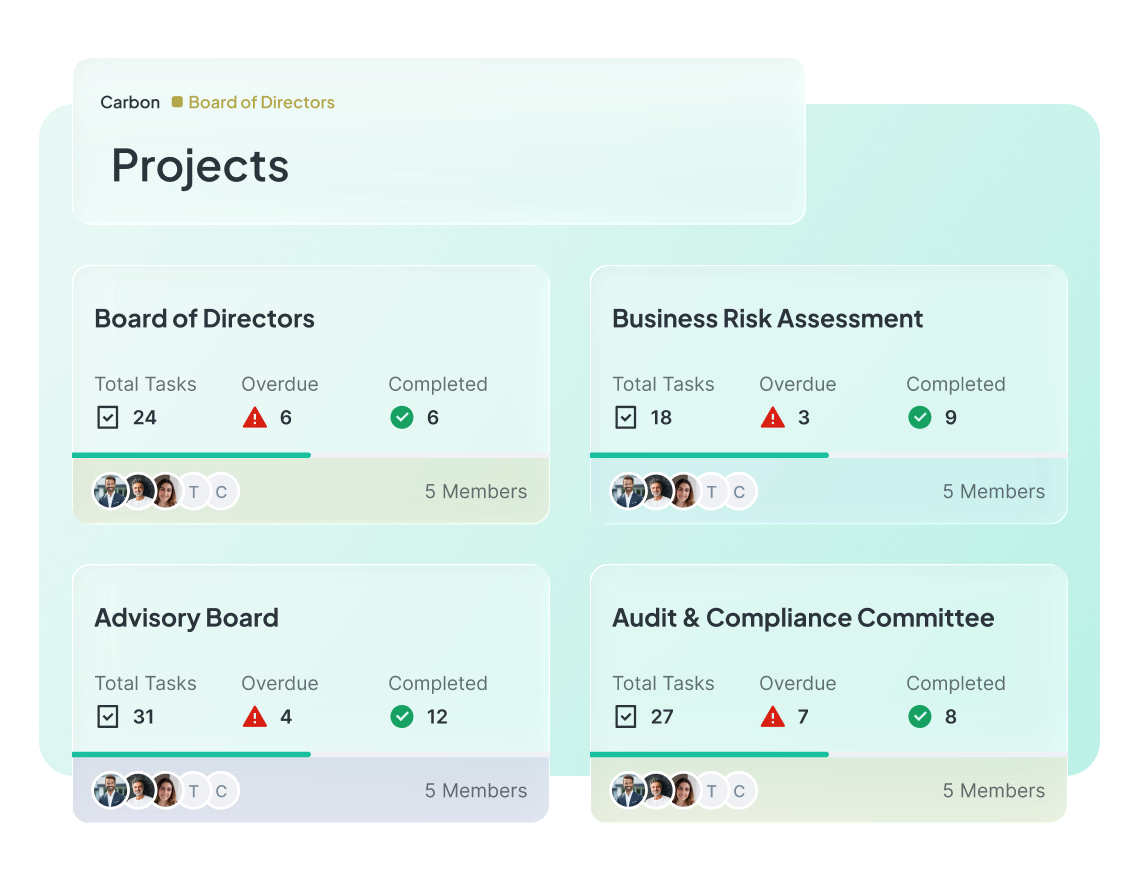
Atlas Gov Projects dashboard showing four governance bodies — Board of Directors, Business Risk Assessment, Advisory Board, and Audit & Compliance Committee — each with total tasks, overdue, and completed counts.

Trusted by leaders elevating governance excellence

Hear from governance officers and board directors who use Atlas Gov every day

Trusted by 650+ organizations and 25.000+ governance professionals worldwide.

C&A Company Logo
CSN Company Logo
CVC Company Logo
ITAIPU Company Logo
AXIA ENERGY Company Logo
RIACHUELO Company Logo
C&A Company Logo
CSN Company Logo
CVC Company Logo
ITAIPU Company Logo
AXIA ENERGY Company Logo
RIACHUELO Company Logo

Questions about Atlas Gov Project Management

How do actions connect to our board meetings? Do we have to create them separately? Abrir
Actions connect directly to your board deliberations. From any meeting minute or deliberation in Atlas, click once to create an action — the owner, deadline, and context populate automatically. The action maintains a permanent link to the source meeting, so months later you can trace exactly which board decision created this work. You can also create standalone actions for work that doesn't originate from a meeting, but most governance teams love the direct connection.
We have some teams that prefer Kanban boards and others that want timelines. Can we use both? Abrir
Yes. Atlas Project Management supports both Kanban boards (for visual workflow tracking) and Gantt timelines (for scheduling and dependencies). Switch between views anytime — they show the same actions, just organized differently. Most governance teams use Kanban for day-to-day status tracking and Gantt for quarterly planning or complex initiatives with dependencies. Both views update in real-time as status changes.
Can board directors see project status, or is this just for governance officers? Abrir
Both. Governance officers manage actions — creating, assigning, updating status. Board directors can view project status directly in their Atlas workspace without needing to ask for updates. You control who sees what: limit certain projects to specific committees, or make strategic initiatives visible to the full board. Directors never need to send "status update?" emails again — they see progress in real-time.
How do we prove to auditors that we're tracking board decisions properly? Abrir
Every action in Atlas Project Management maintains a complete audit trail. We log when the action was created, who created it, every status change with timestamp and user, all comments and updates, and when it was completed. The source meeting link provides governance context. Export audit reports for any timeframe, project, or council. Most compliance teams find this level of traceability exceeds their requirements.
Some of our strategic initiatives have multiple phases. Can we set dependencies between actions? Abrir
Yes. Set dependencies so Action B can't start until Action A completes. Atlas shows the dependency chain in both Kanban and Gantt views. If a predecessor action gets delayed, dependent actions update automatically. For complex initiatives, use checklists within actions for sub-tasks, or create multiple linked actions with clear dependencies. The Gantt view is especially useful for visualizing critical paths across multi-phase projects.
How do action owners know when things are due? We can't rely on people checking the system. Abrir
Atlas sends automatic reminders before deadlines — configurable timing (7 days, 3 days, 1 day, or custom). If an action becomes overdue, escalation notifications alert both the owner and project leads. Owners receive notifications when they're @mentioned, when status changes on actions they're watching, and when announcements are posted. All notifications appear in Atlas inbox and optionally via email. No one can claim they "didn't know."
We need to include action status in board materials. Can we export reports? Abrir
Yes. Generate status reports by council, committee, project, timeframe, or owner. Export as PDF for board books or Excel for detailed analysis. Reports include completion rates, overdue items, and status summaries. Most governance officers include a "Strategic Actions Status" section in their board materials — one click generates it. Directors can also access real-time status in Atlas, reducing the need for static reports.
How long does it take to set up Project Management, and will our team need extensive training? Abrir
Most organizations start using Project Management the same day. Create your first project, add actions, and assign owners in under 10 minutes. The interface works like tools your team already knows — drag-and-drop Kanban, familiar calendar views, standard comment threads. We provide optional training sessions (1 hour) and your dedicated Customer Success Manager can walk through your specific workflow. 24/7 local support available via WhatsApp, email, or phone.
Still have a question? If you didn't find your answer, feel free to reach out
Contact Us