AI that prepares, records, and follows up — so your board focuses on decisions

Board directors spend hours reading static PDFs before every meeting. Governance officers spend hours summarizing them. Atlas AI reads, compares, transcribes, and summarizes your governance materials — so you spend less time preparing and more time deciding.

14 days free
No credit card required
24/7 support
Step-by-step illustration of Atlas AI workflow: identifying risks in agenda materials, listing risks across meeting documents, creating an executive summary, and analyzing meeting transcripts.
Atlas AI chat interface answering questions about financial committee meetings, listing related boards with links, and showing suggested prompt actions.
Pre-meeting

Prepare for any board meeting in minutes, not hours

Board Directors juggle dozens of companies. Governance Officers manage hundreds of pages per meeting. Atlas Insights reads all your materials — agendas, presentations, financials, past decisions — and delivers summaries, key points, and strategic analysis on demand. Ask a question, get an answer. No more digging through PDFs.

Atlas AI overview panel displaying AI-generated meeting notes with suggested actions alongside a real-time transcription feed with speaker identification.
During Meeting

Every answer grounded in your governance context

Generic AI tools don't understand your business. Atlas Insights analyzes your complete meeting ecosystem: preparatory materials, transcriptions, minutes, deliberations, and follow-up actions. It enriches every response with market benchmarks, competitive intelligence, and best practices — so your questions get answers that actually matter.

Atlas AI chat interface with a security lock icon, conversation history sidebar, suggested prompt chips, and a text input field, emphasizing data confidentiality.
After the meeting

AI that keeps confidential information confidential

Board materials are sensitive. Atlas Insights runs in a certified Microsoft Azure environment with ISO 27001, SOC 2, and full LGPD/GDPR compliance. Your data is never used to train external models. Zero third-party access. Every query stays within your secure governance workspace.

How Atlas AI works at every stage of the meeting

Before the Meeting

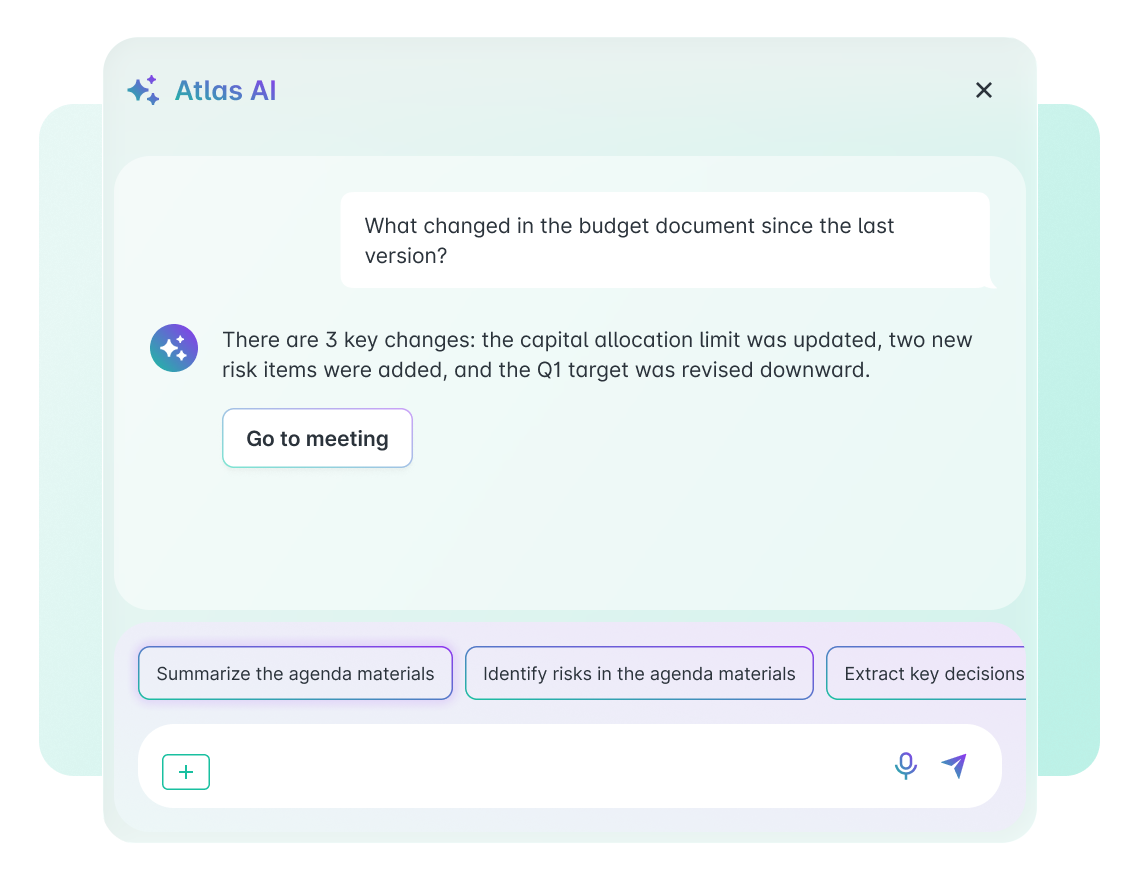
Arrive prepared in minutes. Ask questions to your Bluebook, spot what changed between document versions, and listen to a quick audio summary — all before the meeting starts.

  • AI Insights — Ask questions to your agenda materials and get context-aware answers in seconds 

  • Suggested prompts — Pre-built prompts for common governance tasks (summarize, identify risks, extract decisions) 

  • Speech-to-text — Dictate prompts by voice instead of typing 

  • AI Compare — Automatic detection of changes between document versions attached to agenda items 

  • Meeting Cast — AI-generated audio summary of the Bluebook for quick preparation on the go 

Atlas AI chat interface showing a document comparison response highlighting key changes between budget versions, with suggested prompt chips for summarizing and identifying risks.

Trusted by leaders elevating governance excellence

Hear from governance officers and board directors who use Atlas Gov every day

Trusted by 650+ organizations and 25.000+ governance professionals worldwide.

C&A Company Logo
CSN Company Logo
CVC Company Logo
ITAIPU Company Logo
AXIA ENERGY Company Logo
RIACHUELO Company Logo
C&A Company Logo
CSN Company Logo
CVC Company Logo
ITAIPU Company Logo
AXIA ENERGY Company Logo
RIACHUELO Company Logo

Questions governance teams ask about Atlas AI

Our board discusses highly sensitive information — M&A, executive compensation, legal matters. Is it safe to use AI with this data? Abrir
Yes. All data analyzed by Atlas AI stays exclusively within Atlas Gov's secure environment. No data is sent to external AI providers for model training. The system operates with end-to-end encryption and complies with ISO 27001 (Information Security Management), ISO 27701 (Data Privacy), ISO 27017 and ISO 27018 (Cloud Security). Continuous 24/7 monitoring by SOC and SIEM. Your board materials are never exposed outside your organization's environment.
Can Atlas AI Insights search across all our past meetings, or only the current one? Abrir
Atlas AI Insights currently analyzes content within the context of the specific meeting you're working in — agenda materials, attached documents, and transcriptions for that meeting. This means answers are precise and contextual, drawn directly from the materials your board is reviewing. Cross-meeting search capability is being developed and will be available in upcoming releases.
We use Microsoft Teams for most meetings, but some directors join from different devices or dial in by phone. Will Notetaker still work? Abrir
Atlas AI Notetaker integrates with Microsoft Teams and auto-joins scheduled meetings. It transcribes audio with speaker identification using Assembly AI technology. For hybrid meetings where some participants are in-room, EchoNote captures physical audio. Starting in 2026, Voice Signature improves speaker recognition when multiple people share the same microphone. Audio files are stored temporarily in Azure with automatic deletion within 7 days.
Is Meeting Cast meant to replace reading the Bluebook? Abrir
No. Meeting Cast is a 2-3 minute audio summary designed as a preparation complement — ideal for a quick refresh on key topics before the meeting, during a commute, or between calls. If a director identifies a topic that needs deeper review after listening, they can access the full Bluebook materials or use Insights for detailed analysis. Think of it as a podcast briefing, not a substitute for the materials.
How does AI Compare work when we update a document that's already attached to an agenda? Abrir
When a new version of a document is attached to the same agenda item, Atlas AI Compare automatically detects both versions and analyzes the differences. You see exactly what was added, removed, or modified — presented in a clear summary. No manual upload to a separate comparison tool. No downloading two files to review side by side. The comparison happens inside the meeting context, right where directors access their materials.
Does Atlas AI make decisions or just assist? Abrir
Atlas AI assists. It never makes decisions autonomously. Insights provides answers and summaries — you evaluate them. Compare shows differences — you assess the implications. Notetaker generates draft minutes — you review, edit, and approve before signatures. Every AI output is a starting point that your team controls. The governance process — deliberation, decision, approval — stays entirely with your board.
How long does it take to set up Atlas AI, and do directors need training? Abrir
Atlas AI capabilities are built into the Atlas Gov workspace — there's no separate installation. Organizations typically activate AI features within their existing Atlas Gov setup in days, not weeks. For directors, the experience is intuitive: Insights works like a search bar, Compare runs automatically, and Notetaker joins meetings without any action required. We provide onboarding sessions (1 hour) and your dedicated Customer Success Manager guides the first meetings. 24/7 local support available via WhatsApp, email, or phone.
We hold some board meetings in person. Can we still use AI transcription and minutes? Abrir
Yes. EchoNote is a physical device placed in the meeting room that captures audio from all participants. The recorded audio goes through the same AI pipeline as Notetaker — transcription with speaker identification, summaries, decisions, and task extraction. This means your in-person and hybrid meetings get the same AI-powered post-meeting outputs as your virtual ones. EchoNote is available as an add-on.
Still have a question? If you didn't find your answer, feel free to reach out
Contact Us