Every board decision, recorded with rigor and ready for any scrutiny.

Board decisions deserve more than email threads and memory. Atlas Gov ensures that every vote, every quorum, and every deliberation is recorded with full context — so decisions withstand scrutiny, not just at the moment they are made, but months or years later.

14 days free
No credit card required
24/7 support
Atlas Gov deliberation interface showing a vote for approval of executive decisions with assigned voters, pending votes, reviewers, and Approve, Reject, and Abstain buttons.
Atlas Gov deliberation detail view showing voting tabs, comments, attachments, voting report, start and due dates, and vote tally with Approve, Reject, and Abstain counts.
Decisions don't depend on memory

What was decided, how it was decided, and who agreed — all preserved automatically

Six months after a board decision, questions arise. What exactly was approved? Did we have quorum? Who abstained? With email and video call voting, the answer lives in scattered threads, chat logs, and fading recollections.

Atlas Gov preserves every deliberation with complete context: the motion as presented, the vote as recorded, quorum as verified, and any conflicts declared. When questions come — from auditors, new directors, or legal counsel — the answer is already there. Nothing depends on who remembers what.

Atlas Gov governance dashboard displaying a list of meeting minutes with deliberation dates, board labels, and publication status for compliance documentation.
Compliance evidence that assembles itself

When scrutiny comes, the documentation is already complete

After every board decision, governance officers face the same burden: collect signatures, document who voted which way, compile evidence for compliance files. The work happens after the meeting ends — and it's entirely manual.

Atlas Gov generates complete deliberation records automatically. The moment voting closes, you have: the motion, the result, individual votes (for open ballots), timestamps, quorum confirmation, and any declarations — all in one exportable document. When auditors ask, regulators inquire, or legal needs proof, the answer takes seconds to produce.

Three Atlas Gov mobile app screens showing the governance task list, a deliberation voting view, and a Bluebook resolution report with voting results.
Nothing lives only in emails or chats

Votes are clear — even months later, even after leadership changes

When decisions scatter across email threads, WhatsApp groups, and video call recordings, institutional memory becomes fragile. A new director joins and asks about past decisions. A regulator questions a specific approval. The answer requires archaeology — digging through inboxes, asking colleagues, reconstructing what happened.

Atlas Gov keeps every decision in one place with full context. New directors understand past decisions without reconstruction. Audit questions are answered in minutes, not weeks. The board's decision history remains clear, searchable, and defensible — regardless of who's asking or how much time has passed.

How Atlas Gov protects your board's decisions

Setting Up

Create resolutions in seconds, not email threads. Add a voting item directly from an agenda topic or create a standalone resolution. Choose approval voting for standard motions (yes/no/abstain) or custom polls for multi-option decisions. Configure voting periods, notification preferences, and open or secret ballots. Quorum rules apply automatically based on your council configuration.

  • Two voting types — Approval (yes/no/abstain) for standard motions, Custom for multi-option decisions 

  • Flexible configuration — Set deadlines, open or secret ballots, and automatic reminders 

  • Quorum automation — Rules applied per council/committee, tracked in real-time 

  • Agenda integration — Link deliberations directly to agenda items for context 

  • Voter management — Select voters per deliberation or inherit from meeting participants 

  • Notification control — Automatic alerts via email with in-app reminders 

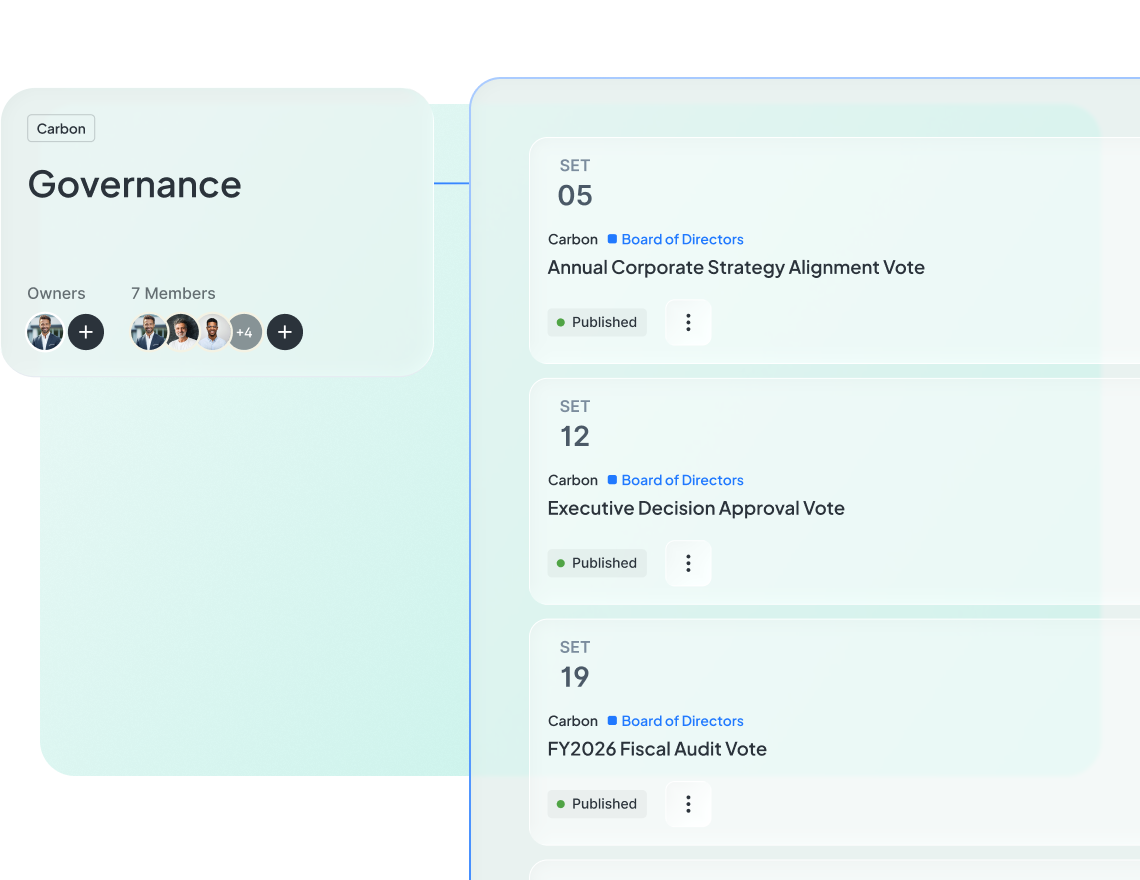
Atlas Gov governance dashboard showing a list of scheduled deliberation votes with dates, board labels, and published status cards.

Trusted by leaders elevating governance excellence

Hear from governance officers and board directors who use Atlas Gov every day

Trusted by 650+ organizations and 25.000+ governance professionals worldwide.

C&A Company Logo
CSN Company Logo
CVC Company Logo
ITAIPU Company Logo
AXIA ENERGY Company Logo
RIACHUELO Company Logo
C&A Company Logo
CSN Company Logo
CVC Company Logo
ITAIPU Company Logo
AXIA ENERGY Company Logo
RIACHUELO Company Logo

Frequently asked questions

We have different types of decisions — some need simple yes/no approval, others need multiple options. Can Atlas Gov handle both? Abrir
Yes. Atlas Gov supports two voting types: Approval voting (yes/no/abstain) for standard motions and resolutions, and Custom polls with unlimited options for complex decisions like vendor selection or budget allocation. Choose the type when creating each deliberation. Both types include full audit trails, quorum tracking, and conflict-of-interest logging.
Our board has specific quorum requirements. How does Atlas Gov track this? Abrir
Configure quorum rules per council or committee in your workspace settings. Atlas Gov calculates quorum automatically for each deliberation based on eligible voters and tracks progress in real-time. You'll see a live indicator showing current votes vs. required quorum. The system won't allow closing a deliberation until quorum is met (unless you override manually). Quorum status is documented in the final report.
Some of our votes need to be secret ballots. Is that possible? Abrir
Yes. When creating a deliberation, choose open ballot (individual votes visible to administrators) or secret ballot (only aggregate results visible). For open ballots, the final report shows who voted which way. For secret ballots, the report shows participation and results without attribution. Both types maintain timestamp logs for audit purposes.
Board members sometimes have conflicts of interest on specific decisions. How do we document this? Abrir
Atlas Gov includes a conflict-of-interest declaration option in every deliberation. Directors can declare a conflict before casting their vote (or abstaining). The declaration is logged with a timestamp and included in the deliberation report. Administrators can also flag conflicts on behalf of directors. All conflicts are searchable and auditable across your governance history.
What happens when a voting deadline passes? Do pending votes get counted? Abrir
You control what happens. Set deadlines when creating the deliberation. When the deadline arrives, you can extend it, close voting (counting only submitted votes), or send final reminders to pending voters. Directors cannot vote after you close the deliberation. The final report shows the deadline, any extensions, and which directors did not vote.
Our directors travel frequently. Can they vote from their phones? Abrir
Yes. Directors vote securely from any device — desktop, tablet, or smartphone. The Atlas Gov mobile experience is optimized for quick voting: open the notification, review the motion, cast your vote. Each vote is timestamped and logged regardless of device. No app download required; works directly in the mobile browser.
Do deliberation results automatically appear in our meeting minutes? Abrir
Yes. When you use Atlas AI to generate meeting minutes, deliberation results are included automatically. The minutes show the motion, result, vote count, and quorum confirmation. For detailed vote breakdowns, the deliberation report is linked. This saves governance officers from manually transcribing voting outcomes.
How do we prove to auditors that a decision was properly made? Abrir
Every deliberation in Atlas Gov generates a complete audit trail. The report includes: who was eligible to vote, who actually voted, how each person voted (for open ballots), timestamps, quorum confirmation, and any conflict declarations. Export this as a PDF anytime. The record is permanent and cannot be altered after voting closes. Most compliance teams use these reports directly for audit documentation.
Still have a question? If you didn't find your answer, feel free to reach out
Contact Us