One board book, every material your directors need

Atlas Bluebook compiles your agenda and attachments into a single organized document, with an automatic table of contents, custom watermark, and access log. Walk into every meeting knowing nothing was left out — and no one can claim they didn't receive the materials.

14 days free
No credit card required
24/7 support
Atlas Gov Bluebook interface showing a board meeting overview with resolutions, version history, and activity log compiled into one document.
Atlas Gov Bluebook interface displaying an auto-generated table of contents alongside a meeting agenda with numbered items and time slots.
Automatic Index & Navigation

Every agenda item, instantly indexed — no manual formatting required

Manually assembled board books in Word require hours of formatting: tables of contents, page numbering, broken links. A last-minute update breaks everything. Atlas Bluebook automatically generates a complete table of contents from your agenda items. Update an attachment and the index updates instantly. Board members navigate 200 pages with a single click.

Atlas Gov Bluebook interface showing annotation and comment threads from board members alongside a meeting resolution with voting results.
Scratch, Highlight & Share Notes

Read, annotate, and prepare without printing a single page

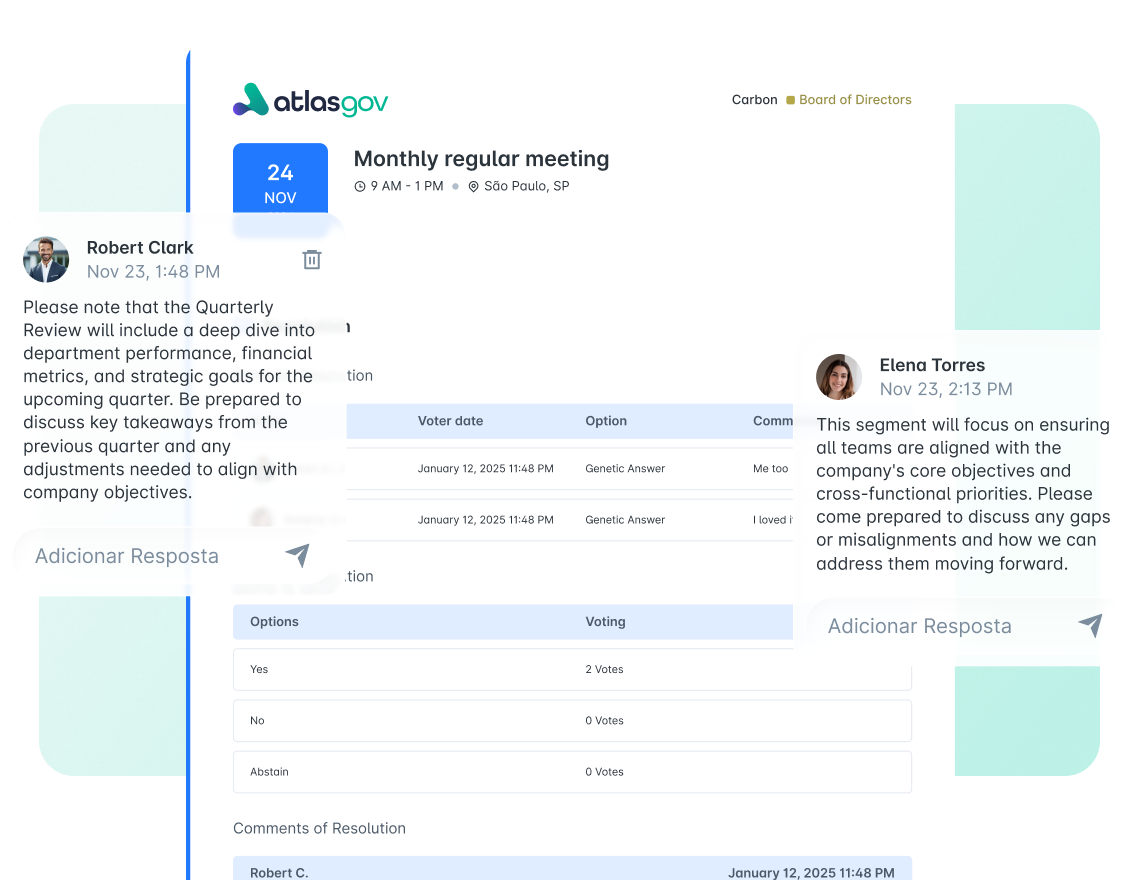
Board members still print 200-page board books just to highlight and take notes. Those markings disappear after the meeting. Atlas Bluebook has built-in annotation and highlighting tools directly on screen. Keep notes private or share with specific board members. Annotations sync across devices and remain available in future meetings.

What directors and governance teams get with Atlas Bluebook

During Preparation

Directors open one document instead of twelve attachments. Highlight, annotate, and flag questions — without printing. Notes sync across all devices.

  • Clickable navigation — Jump to any section from the table of contents 

  • Native highlights — Mark key passages in multiple colors directly on screen 

  • Margin notes — Add questions and comments attached to specific content 

  • Private or shared — Keep notes personal or share with specific directors 

  • Cross-device sync — Annotations follow you across all devices automatically 

Atlas Gov Bluebook interface showing board member annotations, comment threads, and a voting table within a monthly meeting document.

Trusted by leaders elevating governance excellence

Hear from governance officers and board directors who use Atlas Gov every day

Trusted by 650+ organizations and 25.000+ governance professionals worldwide.

C&A Company Logo
CSN Company Logo
CVC Company Logo
ITAIPU Company Logo
AXIA ENERGY Company Logo
RIACHUELO Company Logo
C&A Company Logo
CSN Company Logo
CVC Company Logo
ITAIPU Company Logo
AXIA ENERGY Company Logo
RIACHUELO Company Logo

Questions about Atlas Bluebook 

How long does it take to create a Bluebook? Abrir
If your agenda and attachments are ready in Atlas Gov, generating the Bluebook takes one click. The system compiles documents, builds the table of contents, and calculates page numbers automatically — usually under 30 seconds for a 200-page board book. If you add materials later, regenerating takes the same amount of time.
How do directors access the Bluebook? Do they need special software? Abrir
Directors access the Bluebook through the Atlas Gov web app or mobile apps (iOS and Android). No special software required — any modern browser works. Directors can also download the Bluebook as a PDF for offline reading. The personalized watermark stays embedded regardless of how they access it.
Can directors really annotate on the Bluebook, or do they need to print it? Abrir
Atlas Bluebook includes native annotation tools. Directors highlight text, add margin notes, and mark sections directly in the browser or app — no printing needed. Annotations sync across devices automatically. Directors can keep notes private or share specific annotations with colleagues.
Will the watermark distract directors while reading? Abrir
The watermark is designed to be visible but not intrusive — light enough to read through comfortably, clear enough to identify the source if the document is shared externally. Directors get used to it quickly. The tradeoff is accountability: every page is traceable, which most boards appreciate.
What exactly can I see in the access log? Abrir
The access log shows which directors opened the Bluebook, when they accessed it, total time spent, and which sections they viewed. You can see preparation patterns at a glance — who engaged deeply with materials and who opened briefly or not at all. The log doesn't track keystroke-level detail or record what directors highlight privately.
Can directors access Bluebooks from past meetings? Abrir
Yes. Directors can open any Bluebook from meetings they attended. Past Bluebooks appear exactly as they were distributed — same documents, same structure. Director annotations from those meetings remain attached, so notes and highlights from previous quarters are still accessible.
Our directors travel frequently. Can they read the Bluebook without internet? Abrir
Yes. Directors can download the Bluebook for offline reading through the Atlas Gov mobile app. Annotations made offline sync automatically when connection returns. Most directors download materials before flights and sync their notes after landing.
We already use Atlas Agenda Builder. How does Bluebook connect? Abrir
Atlas Bluebook generates directly from your Agenda Builder setup. Documents attached to agenda items automatically populate the Bluebook. The agenda structure becomes the table of contents. If you update attachments, regenerate with one click. No duplicate uploads or separate configuration needed.
Still have a question? If you didn't find your answer, feel free to reach out
Contact Us