Generate, approve, and sign minutes — all in one place

Stop managing drafts, approvals, and signatures across different tools. Minutes go from draft to signed in hours with AI-assisted minutes generation and Atlas Sign.

14 days free
No credit card required
Enterprise security built in
Atlas Gov minutes interface showing a generated meeting minutes PDF document alongside voting buttons for Approve, Reject, and Abstain.
Atlas AI minutes generator interface displaying an auto-drafted meeting overview with suggested actions, insights tabs, and options to add content to minutes or generate a new version.
AI Drafts, You Finalize

No more writing minutes from scratch after every meeting

After every meeting, governance teams spend days drafting minutes, collecting approvals, and chasing signatures across emails and external tools. It slows execution, increases the risk of inconsistent records, and exposes sensitive documents to insecure channels.

Atlas Minutes Generator transcribes your meeting, extracts key decisions and action items, and drafts structured minutes automatically. You review, refine, and finalize — not start from zero. The AI learns your organization's format and terminology, so each draft gets closer to what you need.

Atlas Gov meeting minutes review interface showing a published minutes document with reviewer comments, approval progress bar, and an approve without comments confirmation dialog.
Automatic Index & Navigation

No more email chains with 'see tracked changes' attachments

Minutes review typically involves multiple Word documents with tracked changes, email chains asking "did you see my comments?", and version confusion about which draft is final. Each revision cycle adds days to your timeline.

Atlas Minutes Review centralizes the entire approval process. Directors review the draft directly in the platform, add comments with @mentions, suggest edits with tracked changes, and approve when ready. You see every comment, edit, and approval status in one place — no more forwarding documents or wondering who's reviewed what.

Atlas Gov meeting minutes interface showing a completed approval workflow with a Signature Board listing signers with Signed and Awaiting signature statuses.
Scratch, Highlight & Share Notes

No more separate tools for signing minutes

Once minutes are approved, most organizations export to PDF, upload to a separate signature tool, send requests to each director, track who signed where, and manually update records. Every step adds friction and compliance risk.

Atlas Sign handles signatures directly in the platform. When minutes are ready, route them for signature with one click. Directors sign digitally from any device — mobile, desktop, even offline. Track every signature with timestamps and audit trails. Every signed document stays connected to the meeting record, searchable forever.

How Minutes & Approval streamlines your post-meeting workflow

After the Meeting

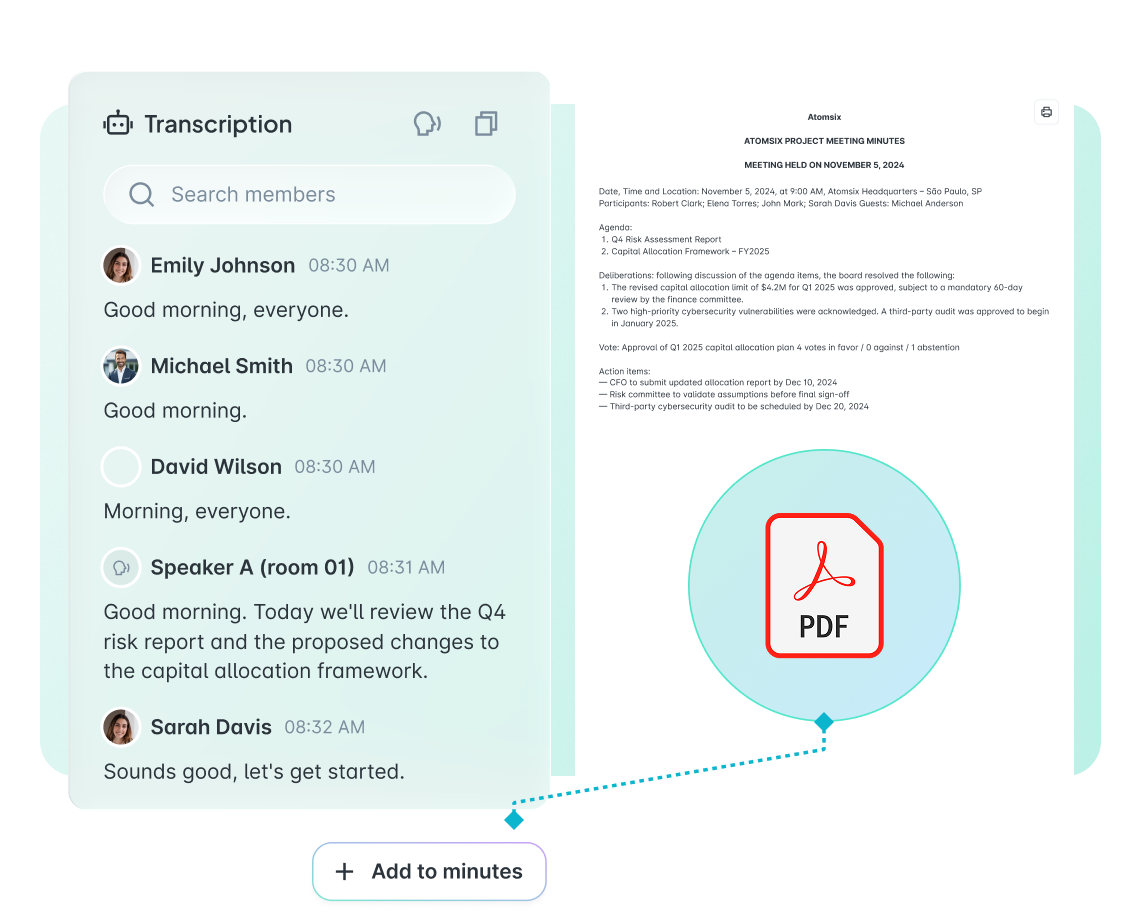
Create complete, accurate minutes in minutes, not hours. Notetaker transcribes your meeting with speaker identification. AI extracts decisions, action items, and key discussion points — then formats them in your organization's standard template. Edit directly in the platform with tracked changes. No Word documents. No starting from scratch. Your first draft is 80% done before you touch the keyboard.

  • Notetaker transcription — Real-time transcription with speaker identification and timestamp markers for easy reference 

  • AI minutes generation — Decisions, actions, and discussion points extracted and structured automatically in your format 

  • In-platform editing — Full editing capabilities with tracked changes, comments, and version history 

  • EchoNote integration — Voice memos from meetings automatically transcribed and linked to minutes 

  • Template library — Standard formats for different meeting types (board, committee, advisory) 

Atlas Gov transcription interface showing a real-time meeting transcript with speaker identification, timestamps, and an option to add content to minutes alongside a PDF document.

Trusted by leaders elevating governance excellence

Hear from governance officers and board directors who use Atlas Gov every day

Trusted by 650+ organizations and 25.000+ governance professionals worldwide.

C&A Company Logo
CSN Company Logo
CVC Company Logo
ITAIPU Company Logo
AXIA ENERGY Company Logo
RIACHUELO Company Logo
C&A Company Logo
CSN Company Logo
CVC Company Logo
ITAIPU Company Logo
AXIA ENERGY Company Logo
RIACHUELO Company Logo

Questions governance teams ask us

How accurate is the AI-generated minutes draft? Will I need to rewrite everything anyway? Abrir
Atlas AI generates drafts that are typically 70-80% ready for review. The AI extracts decisions, action items, and key discussion points from the transcription, then structures them in your organization's format. You review and edit — not rewrite from scratch. The accuracy improves over time as the AI learns your terminology, standard agenda items, and preferred phrasing. Most governance officers report saving 2-3 hours per meeting on minutes preparation. You always have full control to edit, add, or remove any content before routing for review
Our directors are used to reviewing Word documents via email. Will they adapt to reviewing in the platform Abrir
The review experience in Atlas Gov is simpler than email attachments. Directors click a link from their notification, see the minutes draft directly in their browser or app, add comments, and mark as approved. No downloading Word files. No "track changes" compatibility issues. No wondering which version is current. Directors who review on mobile (common for busy executives) find the experience significantly better than opening email attachments. We offer optional 30-minute training sessions, but most directors adapt within their first review cycle.
Are digital signatures through Atlas Sign legally binding? We need to ensure compliance with regulations. Abrir
Yes. Atlas Sign provides legally binding digital signatures compliant with electronic signature laws in Brazil (ICP-Brasil), the US (ESIGN Act), and EU (eIDAS). Each signature includes a timestamp, signer identification, and cryptographic verification hash. The complete audit trail documents who signed, when, from what device, and the document's integrity at signing time. For organizations requiring qualified signatures (ICP-Brasil A3 certificates), Atlas Gov supports certificate-based signing. Our security and compliance documentation is available in the Trust Center.
We have specific minutes formats required by our bylaws and compliance team. Can Atlas Gov accommodate custom templates? Abrir
Yes. Atlas Gov supports custom minutes templates that match your organization's required format. During onboarding, we configure templates for each meeting type (board, audit committee, advisory council, etc.) with your specific sections, headers, and required fields. The AI generates drafts in these templates automatically. You can create multiple templates and select the appropriate one per meeting. Templates can be updated anytime as requirements change. Your dedicated Customer Success Manager helps configure templates during implementation.
How do I know who has reviewed the minutes and who's still pending? We often have to chase directors for approvals Abrir
Atlas Gov shows approval status in real-time. Your dashboard displays exactly who has reviewed (with timestamp), who has comments pending, and who hasn't opened the document yet. No manual tracking spreadsheets. Send reminders to pending reviewers with one click — they receive a notification immediately. Configure automatic reminders for directors who haven't responded within a set timeframe (24 hours, 48 hours, etc.). The system logs all activity for audit purposes: when each director accessed the document, how long they viewed it, and when they approved.
We have meetings with multiple speakers and sometimes poor audio quality. How reliable is the transcription? Abrir
Atlas Notetaker uses advanced speech recognition optimized for meeting environments. It handles multiple speakers, identifies who said what (speaker diarization), and maintains accuracy even with overlapping speech. For optimal results, we recommend using the integrated Zoom or Teams connection, which provides direct audio feed. If audio quality is poor, the transcription marks uncertain sections so you know where to review. You can edit the transcription before generating minutes. For hybrid meetings with in-room participants, a quality conference microphone improves results significantly.
Can we import our existing minutes from past meetings, or do we start fresh Abrir
You can import historical minutes during onboarding. Upload PDF or Word files and we'll help organize them by meeting date and type. These become searchable alongside new minutes generated in Atlas Gov. For ongoing meetings, you'll use the full workflow (transcription → AI draft → review → signature). Many organizations start with new meetings while gradually importing historical records as time permits. Your Customer Success Manager can advise on the best migration approach based on your archive size and priorities.
How long does it take to start using Minutes & Approval? We have quarterly board meetings coming up Abrir
Most organizations are live with Minutes & Approval within 1-2 weeks. Setup includes configuring your minutes templates, setting up Notetaker integration (Zoom or Teams), and establishing your review/approval workflow. Directors need minimal training — the review and signature experience is intuitive. We recommend a pilot meeting (such as a committee meeting) before your board meeting to familiarize your team with the workflow. Your dedicated Customer Success Manager guides you through setup and is available for your first few meetings. 24/7 local support available via WhatsApp, email, or phone.
Still have a question? If you didn't find your answer, feel free to reach out
Contact Us